



WordPress Website Maintenance: Why It Matters and What It Costs
A WordPress website is not something you build once and forget. Plugins update, security holes appear and pages slowly get slower. Regularly updating your website keeps it safe, fast and visible on Google. In this guide, we explain what happens when maintenance is skipped, what regular care includes and how much it usually costs.
What Happens When You Skip Maintenance
Higher Risk of Hacking
WordPress powers a huge share of the web, which makes it a popular target. Most hacked sites are hacked through outdated themes and plugins. Updates and security checks close those gaps before someone uses them.
A Slower Website

Over time, unused plugins, large images and old code add up. A slow site frustrates visitors and hurts customer loyalty, especially for online stores with e-commerce functionality.
Lost Rankings
Google prefers fast, secure, working websites. Broken links, errors and slow pages can push you down, while a well-maintained site supports higher search engine rankings.
The Benefits of Regular Maintenance
- Better security: fewer vulnerabilities and quick fixes if something goes wrong.
- Better user experience: pages and forms that simply work.
- Better performance: faster loading and fewer errors.
- Lower costs over time: preventing major problems is far cheaper than repairing them.
How Much Does WordPress Maintenance Cost?
It depends on the size of your site and how much care it needs. Some tasks, like updating plugins, you can do yourself. However, for security checks, backups and speed optimization, it is recommended to hire a professional. Professional maintenance for a small business site typically ranges from $150 to $500 per month, depending on what is included.
What a Maintenance Plan Should Include

Regular Updates
WordPress core, theme and plugin website updates, tested so nothing breaks.
Security Checks
Malware scans, login protection and monitoring.
Performance Optimization
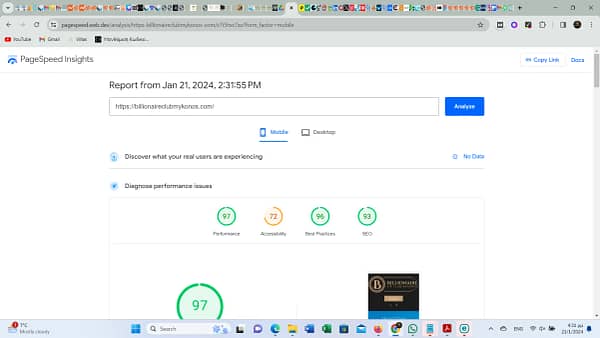
Caching, optimizing images and cleaning up the database to keep your site fast.
Backups and Hosting
Regular backups stored safely, so your site can be restored quickly if needed.
Technical Support
Someone to call when something goes wrong. A good plan should include technical support and help with troubleshooting your website.
Conclusion
Regular maintenance is what keeps a WordPress site, like Only Ninelle’s official website, secure, fast and ready for visitors. Neglecting maintenance usually costs more in the end. If you’d rather leave it to experts, our team can take care of it for you.